A REFERENCE WORKSTATION FOR AI VIDEO CREATORS

Your references.Ready for production.

Prepare the source before the prompt. Search 12 registered sites, save permitted video as MP4 or MP3, and turn available captions into timestamped Markdown notes. The desktop app and fl CLI share one engine.

  • Media files save locally
  • Auto-managed yt-dlp + ffmpeg
  • Windows · macOS · Linux
  • Source on GitHub
Actual desktop app — reference search & queue

Recorded on the real v1.18.0 UI. Not a mockup, not a render.

12 registered search sites

YouTube/X/Reddit/Bilibili/Dailymotion/Niconico/OK.ru/VK Video/Instagram/Threads/TikTok/Vimeo/YouTube · X · Reddit · Bilibili · Dailymotion · Niconico · OK.ru · VK Video · Instagram · Threads · TikTok · Vimeo/
—
GitHub Stars
—
Total downloads
—
Latest release

Stars and downloads come from the GitHub API (release asset counts summed and cached for 10 minutes). They are repository statistics, not a claim about users, speed or creator outcomes.

FEATURE DEMOS

Real screens. Press play.

Twelve short clips recorded on the actual app and CLI. Each caption describes the inputs and results you will see — a record, not a script.

App

Search → queue

Real YouTube search → Add → grid/list queue views, followed by an integrated search across 12 registered sources. Native/index attribution and blocked sources remain visible.

Download GIF · 03-search-and-queue.gif
App

Batch & playlist queues

Import a real .txt list, download two original clips to the selected folder, then expand an official Blender Studio playlist and remove a queue item. The playlist segment shows metadata only.

Download GIF · 04-batch-and-playlist.gif
App

Captions → Markdown

The transcript panel: caption language, metadata and timestamp toggles, Save .md / Copy-to-clipboard checkboxes — then a completion status with the real file path. No captions means an explicit unavailable result, never silent speech-to-text.

Download GIF · 05-captions-to-markdown.gif
App

Settings & history

Select an output folder, change quality and notification preferences, run an individual download and clear the isolated history. Then exercise real video/audio format-ID selectors on HLS sources and save an MP4.

Download GIF · 06-settings-and-history.gif
App

Update center

The published Windows v1.18.0 app checks the live release, confirms it is current, saves a check interval, and checks yt-dlp/FFmpeg status. No available update is fabricated; unsigned macOS updates use a verified DMG.

Download GIF · 07-update-center.gif
CLI

Inspect before download

Metadata, formats, caption languages and real keyword search — inspect sources before downloading.

flucto info · search · languages · formats Download GIF · 08-cli-inspect.gif
CLI

fl batch --json

A URL list becomes a timestamped job folder. Result JSON on stdout, progress NDJSON on stderr, and two real MP3 extractions — agent- and CI-parseable.

flucto download · batch urls.txt -f mp3 -c 2 -p -j Download GIF · 09-cli-batch-json.gif
CLI

fl transcript / md

Captions → frontmatter Markdown in Korean on stdout, then saved English notes. The clip shows the generated file name — real output, piped or written by --stdout/-o.

flucto md <url> -l ko --stdout · -l en -o notes Download GIF · 10-cli-media-markdown.gif
CLI

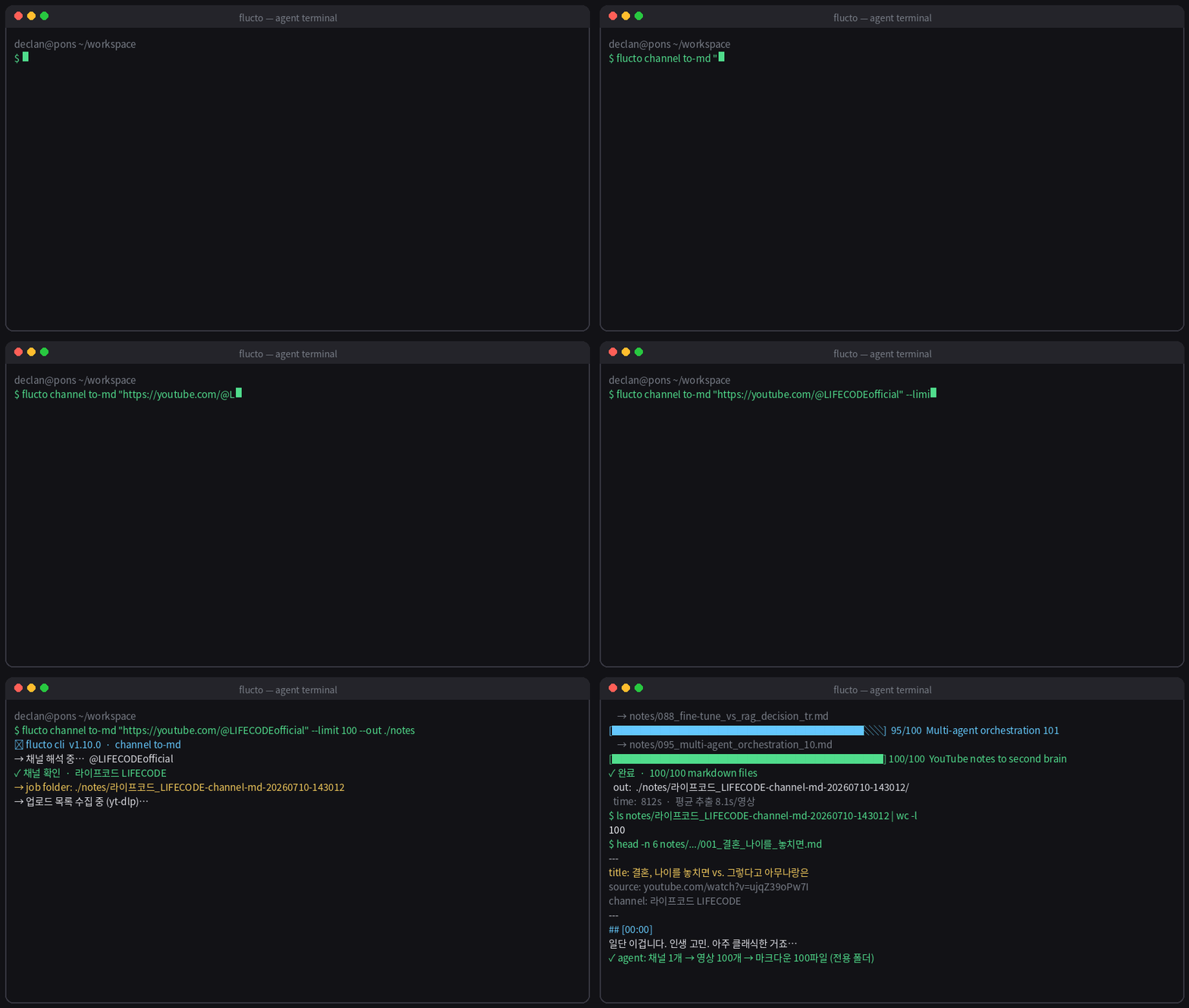
fl channel to-md

A real YouTube channel resolves to a dedicated Blender-channel-md-* folder with two ordered caption notes — capped by --limit 2. No video is downloaded.

flucto channel to-md "@BlenderOfficial" --limit 2 -o notes Download GIF · 11-cli-channel-archive.gif
CLI

fl setup & update

Verify the release ZIP SHA-256, install the bundled CLI into a private prefix with managed Node/yt-dlp/FFmpeg, run doctor, then update in place. The Node download wait is labeled time-compressed.

install.ps1 -NoProfile · flucto doctor · update apply Download GIF · 12-cli-setup-update.gif

Download/extraction demos use original media and authored captions; search/playlist clips show public metadata. Some waits are edited out, so playback is not a speed benchmark. Site access, sessions and captions vary. Check rights before saving media.

INSTALL

Four ways in. One engine.

Pick an installer from the latest release. Every asset ships on GitHub Releases with SHA256 checksums.

The CLI in three steps

  1. 1Download the ZIP and extract it into a writable folder
  2. 2Run install.cmd / bash install.sh — private Node, yt-dlp and ffmpeg, PATH registered
  3. 3Open a new shell and verify with flucto doctor --json
# flucto doctor --json
# PowerShell → flucto / fl.cmd · cmd / POSIX → fl

PowerShell reserves fl for Format-List — use flucto or fl.cmd there; fl works in cmd.exe and POSIX shells. For an isolated install: install.ps1 -InstallDir DIR -NoProfile, or install.sh --install-dir DIR --no-profile.

Just tell your AI agent.

Result JSON lands on stdout, progress events stream as NDJSON on stderr — Claude Code, Codex, and Cursor parse it as-is.

“Install the Flucto CLI from the GitHub release cli-setup.zip (it brings its own Node runtime), then turn this channel's recent captions into timestamped Markdown notes in ./notes: https://www.youtube.com/@handle”

The agent handles install through the final notes — you just read them

HONEST EDGES

What Flucto does not do

It does not generate or edit video

Flucto is the preparation stage of an AI video pipeline: reference capture, audio extraction, caption notes. Rendering, upscaling, and editing stay in your other tools.

Captions only exist when they exist

Markdown conversion is caption-based. If yt-dlp exposes no captions, Flucto reports the transcript unavailable — no Whisper or speech-to-text fallback. Check first with fl l.

It cannot promise every video downloads

A searchable video can still be deleted, private, DRM-protected, or region-locked at download time. Media that needs your own authorized session uses --cookies or --cookies-from-browser. No CAPTCHA solving, no regional bypass.

Some searches need local Chrome

Search on X, Instagram, TikTok, and Vimeo, browser search on OK.ru and Threads, and public-index paths need local Google Chrome (or FLUCTO_CHROME_PATH). Other sites may use Chrome-based fallbacks. Contexts are temporary and anonymous; your logged-in profile is not read.

It needs the internet

Downloads, captions, search, binary provisioning, and update checks all make network requests. The results stay in your local folders.

Rights are yours to clear

Flucto is a tool. Licensing, copyright, and platform terms for anything you save remain your responsibility to check.

Collect first.
Then create.

Save reference video, extract an audio track, and keep caption notes beside your sources. Choose a desktop output folder or use the CLI to create dedicated job folders before your generation tools take over.

Flucto — Independent project · Source on GitHubLatest stable · —